Review the build. Pin the issue. Ship the fix.
Drop DevPin on your preview, staging, or UAT deploy and let clients, QA, and stakeholders pin feedback right on the page. Each pin becomes a ready-to-act task: an AI fix-prompt for Cursor or Claude Code, or an issue in GitHub, Linear, or Jira.
Unlimited reviewers on every plan. Free to start. No per-seat pricing, ever.
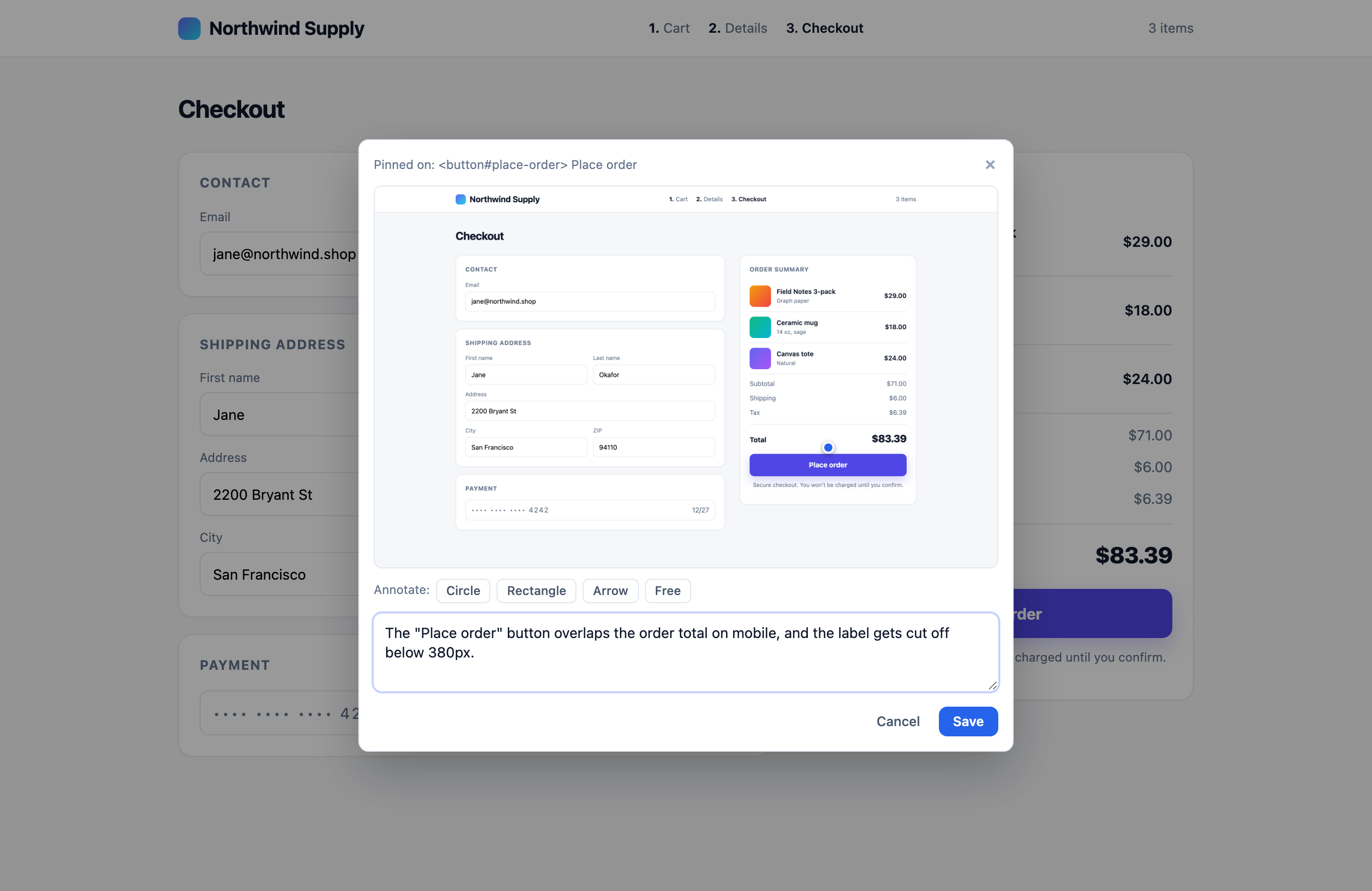
This button is misaligned on mobile and the label gets cut off.
jane@acme.com
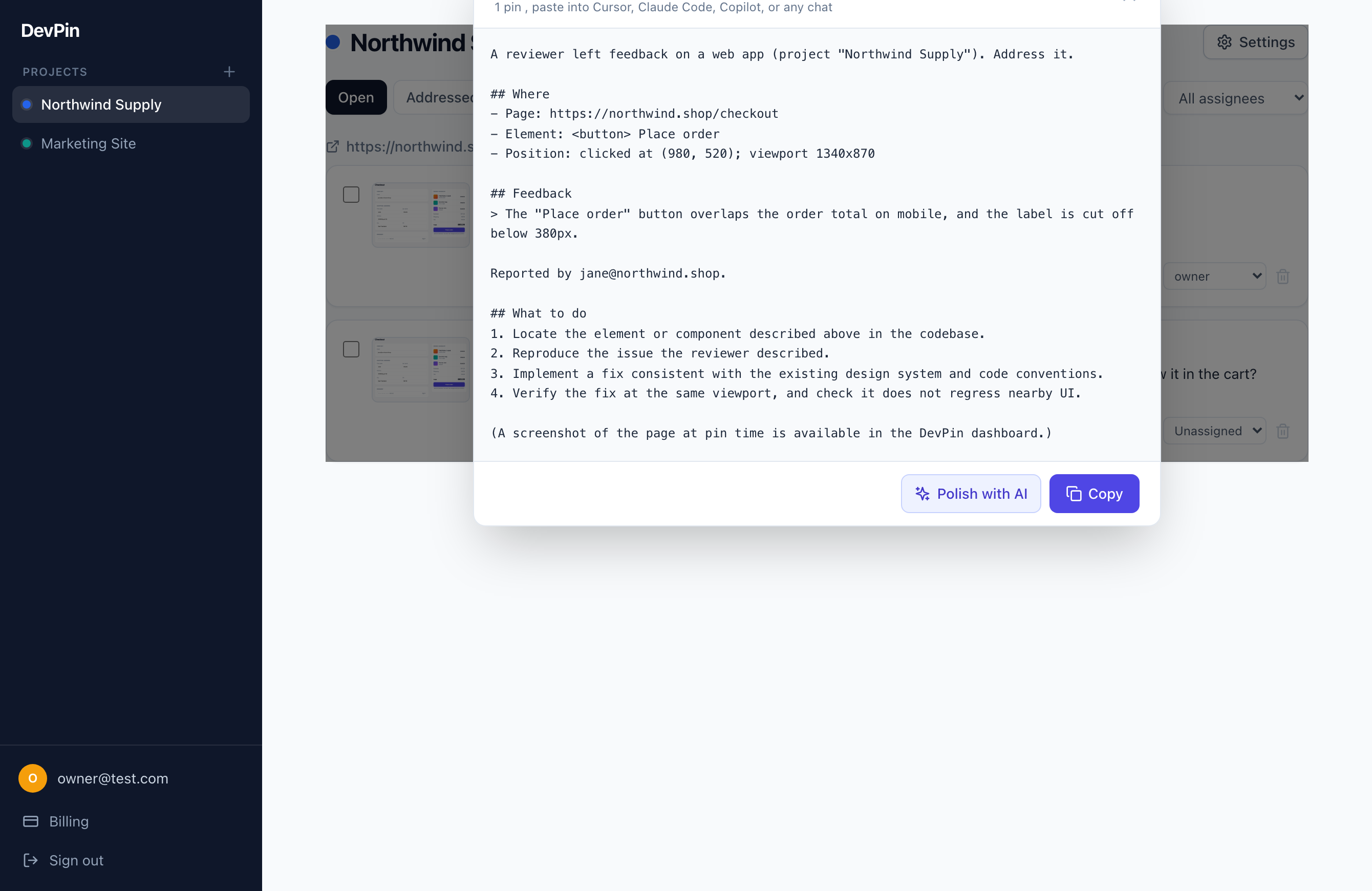
Fix the "Place order" button on /checkout.
It is misaligned on mobile and the
label is truncated.

1. Locate the component.
2. Reproduce at 390px width.
3. Fix per the design system.
4. Verify on mobile.
The problem
Review rounds fall apart between the preview link and the task.
You send a staging link. Back come twelve screenshots, a Slack thread, and "the checkout looks off on mobile" with no URL and no element. Every UAT round, someone replays the build, guesses what the client meant, and retypes it into tickets. DevPin captures each note on the exact element (with the screenshot and the page it happened on) and hands your tools something precise to act on. Less transcribing between rounds, more shipping.
Where DevPin fits
It earns its keep before launch, on every build people review, and keeps watching once you're live.
Preview deploy
Vercel / Netlify PR previews
Staging
Internal QA builds
UAT / client review
Sign-off before launch
Production
Catch regressions too
Made for the people who review your work
Unlimited reviewers on every plan, so inviting the whole room never costs more.
Agencies & freelancers
Let clients mark up the staging build instead of emailing screenshots.
QA & testers
File precise, reproducible bugs straight from the page under test.
Designers
Pin pixel notes on the real preview, not a static mock.
PMs & stakeholders
Approve or flag UAT builds without learning a new tool.
See it in action
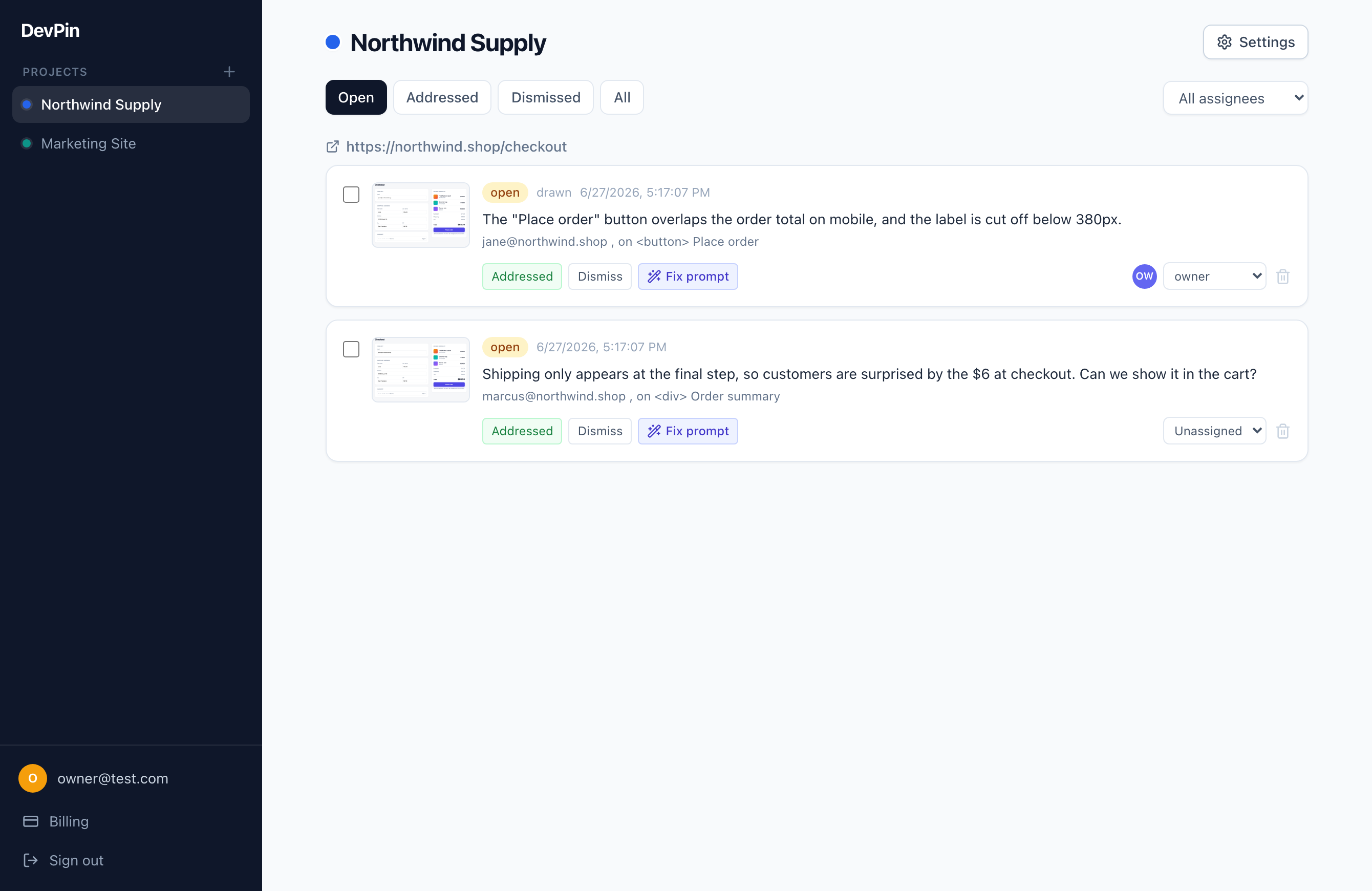
From a reviewer's pin on your staging build to a triaged, ready-to-fix task.
How it works
Add it to your preview build
One script tag on your Vercel/Netlify preview, staging, or production app. The feedback pill shows for every reviewer you invite.
Reviewers pin feedback
Clients, QA, and stakeholders click the page, get an auto screenshot to draw on, and leave a comment. No login friction.
You ship the fix
Each pin arrives with the environment, console errors, and element selector, then becomes a precise task: an AI fix-prompt, a PR opened by Claude, or a one-click issue in GitHub, Linear, or Jira.
Your AI tool reads the feedback and ships the fix.
Connect Claude Code, Cursor, Codex, or Windsurf with one token. The agent pulls each pin (page, element, screenshot, the reviewer's words), makes the change in your editor, and marks it resolved. The agent runs in your environment with your own keys; DevPin just serves the feedback.
{
  "mcpServers": {
    "DevPin": {
      "command": "npx",
      "args": ["-y", "@devpin/mcp"],
      "env": { "DEVPIN_TOKEN": "devpin_..." }
    }
  }
}More than feedback collection
Everything to triage a pin and route it to a fix, your way.
Reproducible by default
Every pin auto-captures the browser, OS, viewport, the exact element selector, console errors, and failed network requests. The context a developer (or an agent) needs to fix it, with no back-and-forth.
AI prompts or bug reports
Per project, turn each pin into a prompt for your AI tool, or a clean human-readable issue.
Pin to fix PR
One click files a GitHub issue tagged @claude so the Claude Code Action opens a pull request. Feedback to a drafted fix, no one else does this.
Export to your tracker
One click from a pin to a GitHub, Linear, or Jira issue, assignee and all.
Board or list triage
Statuses, per-pin assignees, an "assigned to me" queue, and a Kanban board or list view.
Screenshot and draw
Every pin captures the viewport; reviewers circle and arrow exactly what they mean.
Approve or sign off
Switch a project to approval mode for client UAT: reviewers approve or request changes per page, with a sign-off log.
Slack alerts
New feedback posts straight to your Slack channel the moment it lands.
CLI and MCP
Pull feedback into the terminal, or connect it straight to your editor agent.
Works on mobile, too
Reviewers pin and draw with a finger on phones and tablets, not just desktop. Ideal for client UAT on the go.
Built to undercut every competitor
The decisions that make DevPin different, on purpose.
Unlimited reviewers
Every paid tier. No per-seat pricing, ever. Your whole team, your client, their stakeholders, all included.
Magic-link auth
Reviewers type an email, click a link, and pin forever on that device. No passwords, no accounts to provision.
One-line embed
A single script tag on any page. Zero config to start. Works on React, Vue, Next.js, or plain HTML.
No lock-in
Your pins, screenshots, and history export anytime in open formats. Enterprise self-hosting available on request.
Pricing that scales with projects, not people
Unlimited reviewers and unlimited pins on every tier. Paid plans are free during early access.
Free
For side projects
$0/mo
- 1 project
- Unlimited reviewers
- Unlimited pins
- Fix-prompts & bug reports
Pro
For freelancers
$19/mo
- Unlimited projects
- Unlimited reviewers
- AI-polished prompts
- GitHub / Linear / Jira export
- Webhooks
- Priority email support
Team
For agencies
$59/mo
- Everything in Pro
- White-label reviewer pages & emails
- Approval / sign-off mode
- Priority support
Stop transcribing feedback by hand.
Install DevPin in one line and turn your next round of review notes into fixes your AI tools can ship.
Start free